What to Do After a Vulnerability Scan: 10 Step Remediation Roadmap
 WeSecureXOctober 13, 2026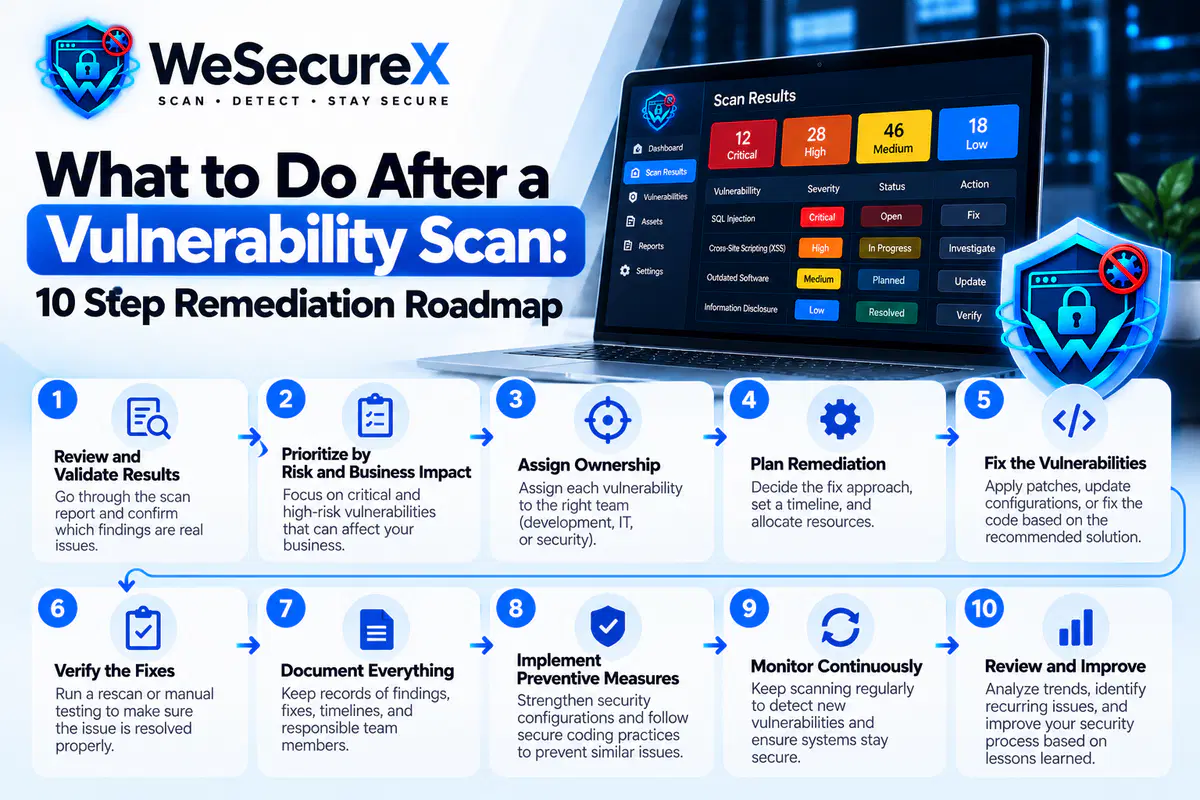
You just finished a vulnerability scan. The report is open on your screen, and it is longer than you hoped. Now what?
Most teams freeze at this point. They read the findings, feel overwhelmed, and close the report. A week later, nothing has changed. The scan produced data but no improvement. That is the gap this guide closes.
Here is a 10 step roadmap for turning scan results into real fixes. If you are new to scanning, start with our vulnerability scanning guide. If you are unsure how often to scan, read our post on how often should you run a vulnerability scan.
Quick Answer
After a vulnerability scan, do these ten things in order: capture the baseline, deduplicate findings, remove false positives, score by business impact, assign owners, fix critical issues first, re-scan to verify, document everything, report to stakeholders, and schedule the next scan. Skip any step and the process breaks.
Step 1: Save and Freeze the Baseline
Before you change anything, save the raw report. Export it as PDF, CSV, and JSON if your tool allows. Record the scan date, scope, and scanner version.
This baseline matters for three reasons. First, it proves what you knew and when, which is useful for compliance. Second, it lets you measure progress over time. Third, if a breach happens later, the baseline shows due diligence.
Store the baseline in a place your whole team can access. A shared drive, a ticket system, or a documentation tool all work. The key is that it survives staff changes.
Step 2: Deduplicate the Findings
The same vulnerability often appears many times in a report. A single outdated library used across forty pages becomes forty findings. A misconfigured header on every route becomes hundreds.
Group findings by their CVE identifier where one exists. Where no CVE exists, group by CWE category. Our guide on CVE vs CWE vs CVSS explains how those identifiers connect.
Deduplication often cuts a 300 item report down to 40 real issues. That single step makes the whole process feel manageable.
Step 3: Remove the False Positives
Not every finding is real. Version detection by banner, generic pattern matching, and stale targets all create false alarms. Our detailed guide on false positives in vulnerability scanning walks through the full triage process.
For each finding, confirm the asset exists, reproduce the issue manually, and check the installed version against the vendor advisory. If it is not exploitable in your environment, close it and tune the scanner so it does not return.
Step 4: Score by Business Impact
Now rank what remains. Do not sort by CVSS alone. A critical score on an unreachable test box matters less than a medium score on your checkout page.
Score each finding on six factors: technical severity, exploitability, asset value, exposure, data sensitivity, and blast radius. Our post on how to prioritize vulnerabilities by business impact gives you a full scoring model you can use today.
Sort the results into four buckets: fix now, fix this sprint, fix this quarter, and accept or monitor.
Step 5: Assign Owners and Deadlines
A priority without an owner is a wish. Every finding that stays open needs a name and a date attached.
Use a simple table like this:
| Severity | Owner | Deadline |
|---|---|---|
| Critical | On call engineer | 24 to 48 hours |
| High | Team lead | 7 days |
| Medium | Assigned developer | 30 days |
| Low | Backlog owner | 90 days |
Publish the table where the whole team can see it. Visibility drives follow through.
Step 6: Fix Critical Issues First
Start with the fix now bucket. These are findings that are exploitable, exposed, and touching sensitive data or revenue. Patch, reconfigure, or mitigate.
Some fixes are quick. Updating a library, disabling a service, or adding a security header takes minutes. Others require refactoring. For those, apply a temporary mitigation while the real fix is built.
If you keep finding the same class of bug, like SQL injection or XSS, the problem is your coding practice. Fix the pattern, not just the instance. Review our web security basics guide for the foundations.
Step 7: Re-Scan to Verify
Never assume a fix worked. Re-scan the affected systems after remediation. Confirm the finding is gone and no new issues appeared.
Verification catches three problems. It catches fixes that did not deploy. It catches fixes that broke something else. And it catches findings the scanner reported incorrectly as resolved.
Run verification scans as soon as fixes are deployed. Do not wait for the next scheduled scan.
Step 8: Document Everything
Write down what you found, what you fixed, what you accepted, and why. This record serves four purposes.
It proves due diligence for auditors and customers.
It helps new team members understand past decisions.
It prevents you from re-litigating the same questions.
It feeds into your compliance evidence for standards like PCI DSS or GDPR for developers.
Keep the documentation simple. A spreadsheet or ticket system is enough. The important thing is that it exists and stays current.
Step 9: Report to Stakeholders
Security work is invisible until something breaks. Report your scan results to leadership in business terms.
Skip the CVE numbers in the executive summary. Instead, say: we scanned 42 systems, found 12 real issues, fixed 9 within a week, and 3 remain with a plan and a date. Include the trend. Are findings going down over time? That is the number leaders care about.
For technical stakeholders, share the full detail. Give engineers the raw findings, the reproduction steps, and the fix guidance. Different audiences need different reports.
Step 10: Schedule the Next Scan
Remediation is a cycle, not a project. Once you close this round, the next one begins. Schedule your next scan based on your risk profile. Weekly is the safe default for most teams. Daily or continuous is better for high risk systems.
Add post deployment scans to your release process. Every release should trigger a scan. That way new code never goes live without a check.
A Worked Example
Imagine a small SaaS team. Their scan returns 180 findings. Here is how the roadmap plays out.
They save the baseline and export it. Deduplication reduces 180 to 46. False positive triage removes 19 more, leaving 27 real issues. They score those 27 by business impact. Five are fix now, nine are fix this sprint, eight are fix this quarter, and five are accepted with a review date.
They assign owners. The five critical issues get fixed within 48 hours. Re-scan confirms four are resolved. One needs a different approach, so they apply a temporary mitigation and open a longer ticket.
They document everything and report to leadership. Findings dropped from 27 to 1 unresolved critical in one week. The next scan is scheduled for the following Monday.
That is the entire process in action. No drama, no heroics, just a repeatable system.
Common Mistakes After a Scan
Reading the report and doing nothing. The most common failure. Scans only help if you act.
Fixing everything at once. You will burn out. Fix by priority, not by volume.
Skipping verification. Unverified fixes are guesses.
Ignoring the low findings forever. Review accepted risks every quarter. Exposure changes.
No documentation. Without records, compliance becomes painful and progress is invisible.
Reporting only to engineers. Leadership needs a business summary to keep funding security.
Scanning without scheduling the next run. One scan is a snapshot, not a program.
Quick Checklist
- □
Baseline saved and exported
- □
Findings deduplicated by CVE or CWE
- □
False positives closed and scanner tuned
- □
Findings scored by business impact
- □
Owners and deadlines assigned
- □
Critical issues fixed first
- □
Re-scan completed to verify fixes
- □
Documentation updated
- □
Stakeholder report delivered
- □
Next scan scheduled
FAQ
How soon should I act after a vulnerability scan?
Triage within 24 hours. Fix critical findings within 48 hours. Schedule the rest based on priority.
What if I cannot fix a finding?
Apply a temporary mitigation, document the risk, and set a review date. Do not leave it unowned.
Do I need to re-scan every fix?
Yes. Verification is what confirms the fix actually worked.
How do I know which findings are real?
Confirm the asset exists, reproduce the issue manually, and check the installed version against the vendor advisory.
Should I fix low severity findings?
Deprioritize them, but do not ignore them. Review your accepted risks every quarter.
What if my team is too small for this process?
Start with steps 1, 2, 3, 4, and 6. Those five steps deliver most of the value for a small team.
How do I measure progress?
Track the number of open critical and high findings over time. If that number drops, your process is working.
Conclusion
A vulnerability scan is the start of a process, not the end of one. What you do after the scan determines whether you get safer or just busier. Follow the ten steps: save the baseline, deduplicate, remove false positives, score by impact, assign owners, fix criticals, verify, document, report, and schedule the next scan.
Do that each cycle and your security posture improves every month, even with limited time and a small team.
Need help building a remediation workflow? Explore our guides, browse the WeSecureX blog, check our pricing, or contact us for a security review.
Audit Your Website for Vulnerabilities in Real Time
Run an automated OWASP Top 10 security assessment, check SSL/TLS posture, and map your attack surface.
Related Technical Articles & Research
How to Scan a Website Without Breaking It
Essential DAST best practices: rate limiting, safe request windows, and non-destructive payload testing on production web apps.
False Positives in Vulnerability Scanning: How to Triage Them
Techniques to distinguish real security vulnerabilities from scanner noise, verify proof-of-concepts, and streamline security operations.
How to Prioritize Vulnerabilities by Business Impact
Contextual risk scoring: why raw CVSS scores fall short and how asset criticality and exploitability dictate remediation urgency.
CVE vs CWE vs CVSS: Plain English Guide for 2026
Demystifying CVE flaw IDs, CWE taxonomy weaknesses, and CVSS v3.1/v4.0 severity scoring metrics for web developers.